Processes and threads are the foundation almost every other user-mode mechanism is built on, so getting a clear mental model of them pays off across debugging, performance work, and security. Windows exposes a clean API for all of this, yet the topic stays murky for most people - the genuinely interesting parts (the kernel structures, the scheduler, the exotic process types) are sparsely documented and scattered.
This post is the tour I wish I’d had. Rather than restating the API reference, it builds the concepts up, shows the kernel structures behind each one, and the part most write-ups skip points you at how to see all of it on a live system with WinDbg or Process Explorer. We’ll also cover the fiber and job APIs that sit on top, and bring a few details up to date (WSL2, Windows containers) that older treatments predate.
Process and Thread relationship
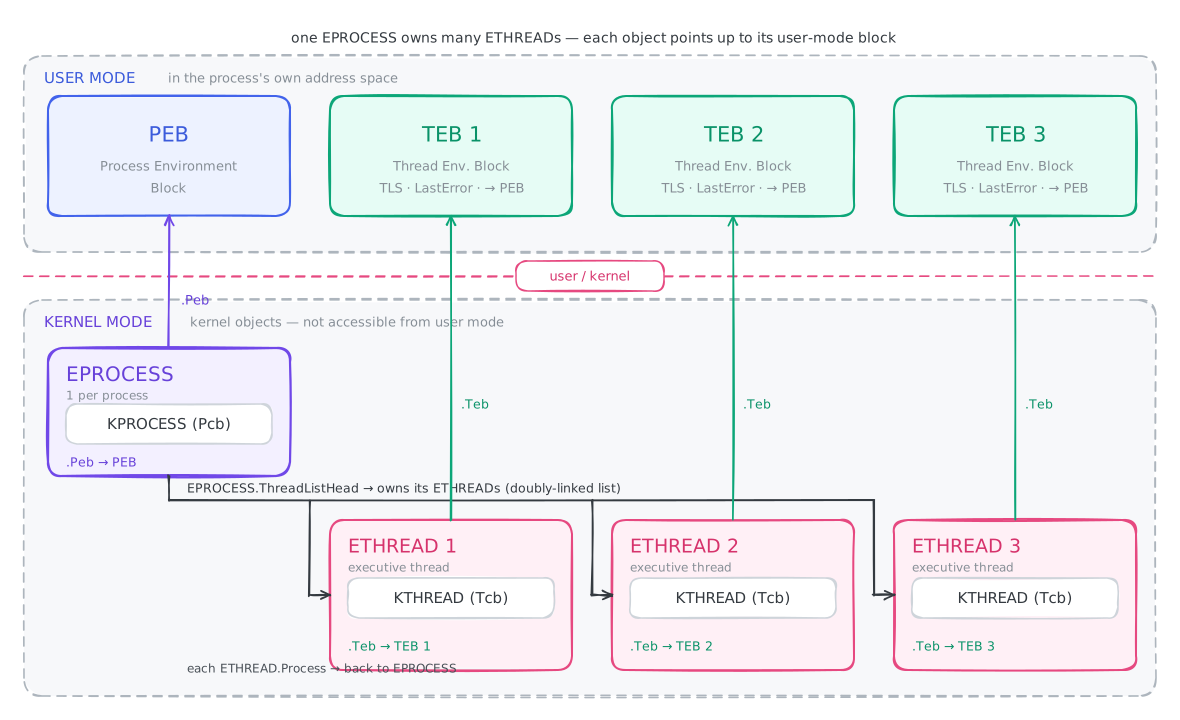
Here is a summary of where are placed and how are interconnected together. Here is also an overview of how some process and thread structures are interlinked.
Let’s dive into processes now.
Processes
A common misconception is that a program and a process are the same thing. They aren’t. A program is just a file sitting on disk that holds code. A process, by contrast, is a live container: it holds one or more threads along with all the resources those threads need in order to run.
Process Resources
What does a process actually own? The exact set varies, but nearly every process carries the same core pieces.
Process Identifier (PID) - A unique number that identifies the process on the system. Two processes can share the same name, but no two processes can share the same PID at the same time.
Private Virtual Address Space - A reserved range of virtual addresses the process is allowed to use. The size differs across systems and configurations.
Executable Code - The code mapped into the process’s address space from its backing program. Interestingly, a process can exist without any executable code - Windows uses such processes for a few special purposes.
Handle Table - Holds pointers to the kernel objects the process is using. The handle values the API hands you are really just indices into this table. It lives in kernel mode and can’t be touched directly from user mode - and it only tracks kernel objects, not categories like GDI or user objects.
Access Token - Every process carries an access token describing its security context: which user it belongs to, what privileges it holds, and so on.
Process Environment Block (PEB) - A user-mode, per-process structure packed with information about the process - its command-line arguments, whether it is being debugged, the list of loaded modules, and much more. Microsoft doesn’t document it, but here’s what it looks like:
 1struct _PEB {
 2    0x000 BYTE InheritedAddressSpace;
 3    0x001 BYTE ReadImageFileExecOptions;
 4    0x002 BYTE BeingDebugged;
 5    0x003 BYTE SpareBool;
 6    0x004 void* Mutant;
 7    0x008 void* ImageBaseAddress;
 8    0x00c _PEB_LDR_DATA* Ldr;
 9    0x010 _RTL_USER_PROCESS_PARAMETERS* ProcessParameters;
10    0x014 void* SubSystemData;
11    0x018 void* ProcessHeap;
12    0x01c _RTL_CRITICAL_SECTION* FastPebLock;
13    0x020 void* FastPebLockRoutine;
14    0x024 void* FastPebUnlockRoutine;
15    0x028 DWORD EnvironmentUpdateCount;
16    0x02c void* KernelCallbackTable;
17    0x030 DWORD SystemReserved[1];
18    0x034 DWORD ExecuteOptions:2;
19    0x034 DWORD SpareBits:30;
20    0x038 _PEB_FREE_BLOCK* FreeList;
21    0x03c DWORD TlsExpansionCounter;
22    0x040 void* TlsBitmap;
23    0x044 DWORD TlsBitmapBits[2];
24    0x04c void* ReadOnlySharedMemoryBase;
25    0x050 void* ReadOnlySharedMemoryHeap;
26    0x054 void** ReadOnlyStaticServerData;
27    0x058 void* AnsiCodePageData;
28    0x05c void* OemCodePageData;
29    0x060 void* UnicodeCaseTableData;
30    0x064 DWORD NumberOfProcessors;
31    0x068 DWORD NtGlobalFlag;
32    0x070 _LARGE_INTEGER CriticalSectionTimeout;
33    0x078 DWORD HeapSegmentReserve;
34    0x07c DWORD HeapSegmentCommit;
35    0x080 DWORD HeapDeCommitTotalFreeThreshold;
36    0x084 DWORD HeapDeCommitFreeBlockThreshold;
37    0x088 DWORD NumberOfHeaps;
38    0x08c DWORD MaximumNumberOfHeaps;
39    0x090 void** ProcessHeaps;
40    0x094 void* GdiSharedHandleTable;
41    0x098 void* ProcessStarterHelper;
42    0x09c DWORD GdiDCAttributeList;
43    0x0a0 void* LoaderLock;
44    0x0a4 DWORD OSMajorVersion;
45    0x0a8 DWORD OSMinorVersion;
46    0x0ac WORD OSBuildNumber;
47    0x0ae WORD OSCSDVersion;
48    0x0b0 DWORD OSPlatformId;
49    0x0b4 DWORD ImageSubsystem;
50    0x0b8 DWORD ImageSubsystemMajorVersion;
51    0x0bc DWORD ImageSubsystemMinorVersion;
52    0x0c0 DWORD ImageProcessAffinityMask;
53    0x0c4 DWORD GdiHandleBuffer[34];
54    0x14c void (*PostProcessInitRoutine)();
55    0x150 void* TlsExpansionBitmap;
56    0x154 DWORD TlsExpansionBitmapBits[32];
57    0x1d4 DWORD SessionId;
58    0x1d8 _ULARGE_INTEGER AppCompatFlags;
59    0x1e0 _ULARGE_INTEGER AppCompatFlagsUser;
60    0x1e8 void* pShimData;
61    0x1ec void* AppCompatInfo;
62    0x1f0 _UNICODE_STRING CSDVersion;
63    0x1f8 void* ActivationContextData;
64    0x1fc void* ProcessAssemblyStorageMap;
65    0x200 void* SystemDefaultActivationContextData;
66    0x204 void* SystemAssemblyStorageMap;
67    0x208 DWORD MinimumStackCommit;
68};
Thread - The entity inside a process that actually runs code. Every process starts with at least one thread - the primary thread. A process with zero threads can technically exist, but nothing executes, so it’s not particularly useful.
EPROCESS structure - The kernel’s own representation of a process object. It’s enormous - it holds essentially everything the kernel knows about a process. Microsoft doesn’t document it. We will inspect it in below section.
KPROCESS structure - Nested inside
EPROCESS, this carries scheduling and memory-related details: a pointer to the process’s page directory, CPU time spent in user mode versus kernel mode, affinity, and more. Also undocumented. A trimmed-down view:
 1struct _KPROCESS {
 2  struct _DISPATCHER_HEADER Header;
 3  struct _LIST_ENTRY ProfileListHead;
 4  unsigned int DirectoryTableBase;
 5  unsigned long Asid;
 6  struct _LIST_ENTRY ThreadListHead;
 7  unsigned long ProcessLock;
 8  unsigned long Spare0;
 9  unsigned int DeepFreezeStartTime;
10  struct _KAFFINITY_EX Affinity;
11  struct _LIST_ENTRY ReadyListHead;
12  struct _SINGLE_LIST_ENTRY SwapListEntry;
13  struct _KAFFINITY_EX ActiveProcessors;
14  long AutoAlignment : 1;
15  long DisableBoost : 1;
16  long DisableQuantum : 1;
17  unsigned long DeepFreeze : 1;
18  unsigned long TimerVirtualization : 1;
19  unsigned long CheckStackExtents : 1;
20  unsigned long SpareFlags0 : 2;
21  unsigned long ActiveGroupsMask : 20;
22  long ReservedFlags : 4;
23  long ProcessFlags;
24  char BasePriority;
25  char QuantumReset;
26  unsigned int Visited;
27  union _KEXECUTE_OPTIONS Flags;
28  unsigned long ThreadSeed[20];
29  unsigned int IdealNode[20];
30  unsigned int IdealGlobalNode;
31  union _KSTACK_COUNT StackCount;
32  struct _LIST_ENTRY ProcessListEntry;
33  unsigned int CycleTime;
34  unsigned int ContextSwitches;
35  struct _KSCHEDULING_GROUP *SchedulingGroup;
36  unsigned long FreezeCount;
37  unsigned long KernelTime;
38  unsigned long UserTime;
39  void *InstrumentationCallback;
40};
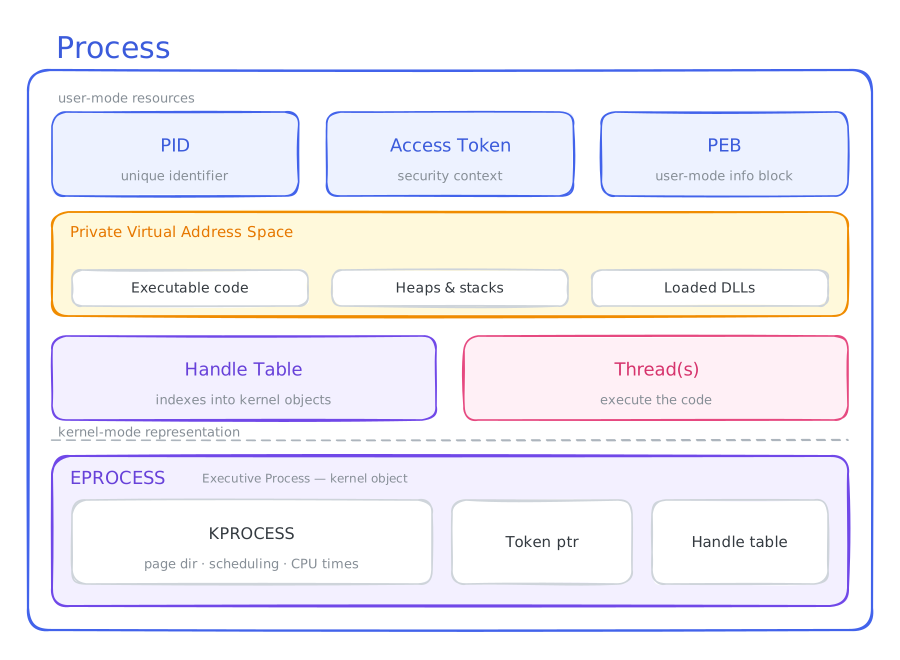
The diagram below pulls these pieces together - the user-mode resources a process owns, and the kernel-mode EPROCESS/KPROCESS objects that back it.
Inspect it yourself
Every structure covered above has a live counterpart you can read directly from a running system. Here’s how.
WinDbg (kernel debugger)
EPROCESS is the kernel’s primary record for a process - the kernel-side mirror of the user-mode PEB. Targeting lsass.exe in WinDbg gives us its EPROCESS address right away:
0: kd> !process  0 0 lsass.exe
PROCESS ffffcf0514782180
	SessionId: 0  Cid: 02dc    Peb: c7661b7000  ParentCid: 024c
	DirBase: 10c761002  ObjectTable: ffff840f5f125d00  HandleCount: 1388.
	Image: lsass.exe
From there we can dump the structure itself. Output is trimmed to the fields that matter:
kd> dt nt!_eprocess ffffcf0514782180
   +0x000 Pcb              : _KPROCESS
    ...
   +0x4b8 Token            : _EX_FAST_REF
    ...
   +0x550 Peb              : 0x0000000f`a07b9000 _PEB
    ...
   +0x570 ObjectTable      : 0xffff840f`5f125d00 _HANDLE_TABLE
Three fields stand out. Pcb is the nested KPROCESS - it holds the physical page-directory address loaded into CR3 on every context switch, plus scheduling data: quantum, affinity, and base priority. Peb points into user-land, linking this kernel record back to the PEB. And ObjectTable is a pointer to the Handle Table that tracks every kernel object the process holds open.
Looking inside the nested KPROCESS:
0: kd> dt nt!_KPROCESS ffffcf0514782180
   +0x000 Header           : _DISPATCHER_HEADER
   +0x018 ProfileListHead  : _LIST_ENTRY [ 0xffffcf05`14782198 - 0xffffcf05`14782198 ]
   +0x028 DirectoryTableBase : 0x00000001`0c761002
   +0x030 ThreadListHead   : _LIST_ENTRY [ 0xffffcf05`14779378 - 0xffffcf05`19c1d378 ]
   +0x040 ProcessLock      : 0
   +0x044 ProcessTimerDelay : 0
   +0x048 DeepFreezeStartTime : 0
   +0x050 Affinity         : _KAFFINITY_EX
   +0x0f8 AffinityPadding  : [12] 0
   +0x158 ReadyListHead    : _LIST_ENTRY [ 0xffffcf05`147822d8 - 0xffffcf05`147822d8 ]
   +0x168 SwapListEntry    : _SINGLE_LIST_ENTRY
   +0x170 ActiveProcessors : _KAFFINITY_EX
   +0x218 ActiveProcessorsPadding : [12] 0
    ...
Access Token
The token lives in EPROCESS.Token as a tagged pointer. Mask off the tag bits before passing it to !token:
0: kd> dt nt!_EPROCESS ffffcf0514782180 Token.Object
   +0x4b8 Token        :
      +0x000 Object       : 0xffff840f`5f1ab9be Void

0: kd> !token @@C++(0x0xffff840f5f1ab9be & ~0xf)
Thread is not impersonating. Using process token...
_EPROCESS 0xffffcf0511067080, _TOKEN 0x0000000000000000
TS Session ID: 0
User: S-1-5-18
User Groups:
 00 S-1-5-32-544
    Attributes - Default Enabled Owner
 01 S-1-1-0
    Attributes - Mandatory Default Enabled
 02 S-1-5-11
    Attributes - Mandatory Default Enabled
 03 S-1-16-16384
    Attributes - GroupIntegrity GroupIntegrityEnabled
Primary Group: S-1-5-18
Privs:
 02 0x000000002 SeCreateTokenPrivilege            Attributes -
 03 0x000000003 SeAssignPrimaryTokenPrivilege     Attributes -
 04 0x000000004 SeLockMemoryPrivilege             Attributes - Enabled Default
 05 0x000000005 SeIncreaseQuotaPrivilege          Attributes -
 07 0x000000007 SeTcbPrivilege                    Attributes - Enabled Default
 08 0x000000008 SeSecurityPrivilege               Attributes -
 09 0x000000009 SeTakeOwnershipPrivilege          Attributes -
 10 0x00000000a SeLoadDriverPrivilege             Attributes -
 11 0x00000000b SeSystemProfilePrivilege          Attributes - Enabled Default
 12 0x00000000c SeSystemtimePrivilege             Attributes -
 13 0x00000000d SeProfileSingleProcessPrivilege   Attributes - Enabled Default
 14 0x00000000e SeIncreaseBasePriorityPrivilege   Attributes - Enabled Default
 15 0x00000000f SeCreatePagefilePrivilege         Attributes - Enabled Default
 16 0x000000010 SeCreatePermanentPrivilege        Attributes - Enabled Default
 17 0x000000011 SeBackupPrivilege                 Attributes -
 18 0x000000012 SeRestorePrivilege                Attributes -
 19 0x000000013 SeShutdownPrivilege               Attributes -
 20 0x000000014 SeDebugPrivilege                  Attributes - Enabled Default
 21 0x000000015 SeAuditPrivilege                  Attributes - Enabled Default
 22 0x000000016 SeSystemEnvironmentPrivilege      Attributes -
 23 0x000000017 SeChangeNotifyPrivilege           Attributes - Enabled Default
 25 0x000000019 SeUndockPrivilege                 Attributes -
 28 0x00000001c SeManageVolumePrivilege           Attributes -
 29 0x00000001d SeImpersonatePrivilege            Attributes - Enabled Default
 30 0x00000001e SeCreateGlobalPrivilege           Attributes - Enabled Default
 31 0x00000001f SeTrustedCredManAccessPrivilege   Attributes -
 32 0x000000020 SeRelabelPrivilege                Attributes -
 33 0x000000021 SeIncreaseWorkingSetPrivilege     Attributes - Enabled Default
 34 0x000000022 SeTimeZonePrivilege               Attributes - Enabled Default
 35 0x000000023 SeCreateSymbolicLinkPrivilege     Attributes - Enabled Default
 36 0x000000024 SeDelegateSessionUserImpersonatePrivilege  Attributes - Enabled Default
Authentication ID:         (0,3e7)
Impersonation Level:       Anonymous
TokenType:                 Primary
Source: *SYSTEM*           TokenFlags: 0x2000 ( Token in use )
Token ID: 3eb              ParentToken ID: 0
Modified ID:               (0, 3ec)
RestrictedSidCount: 0      RestrictedSids: 0x0000000000000000
OriginatingLogonSession: 0
PackageSid: (null)
CapabilityCount: 0      Capabilities: 0x0000000000000000
LowboxNumberEntry: 0x0000000000000000
Security Attributes:
Invalid AUTHZBASEP_SECURITY_ATTRIBUTES_INFORMATION with no claims
Process Token TrustLevelSid: S-1-19-1024-8192
Process Explorer (no debugger needed)
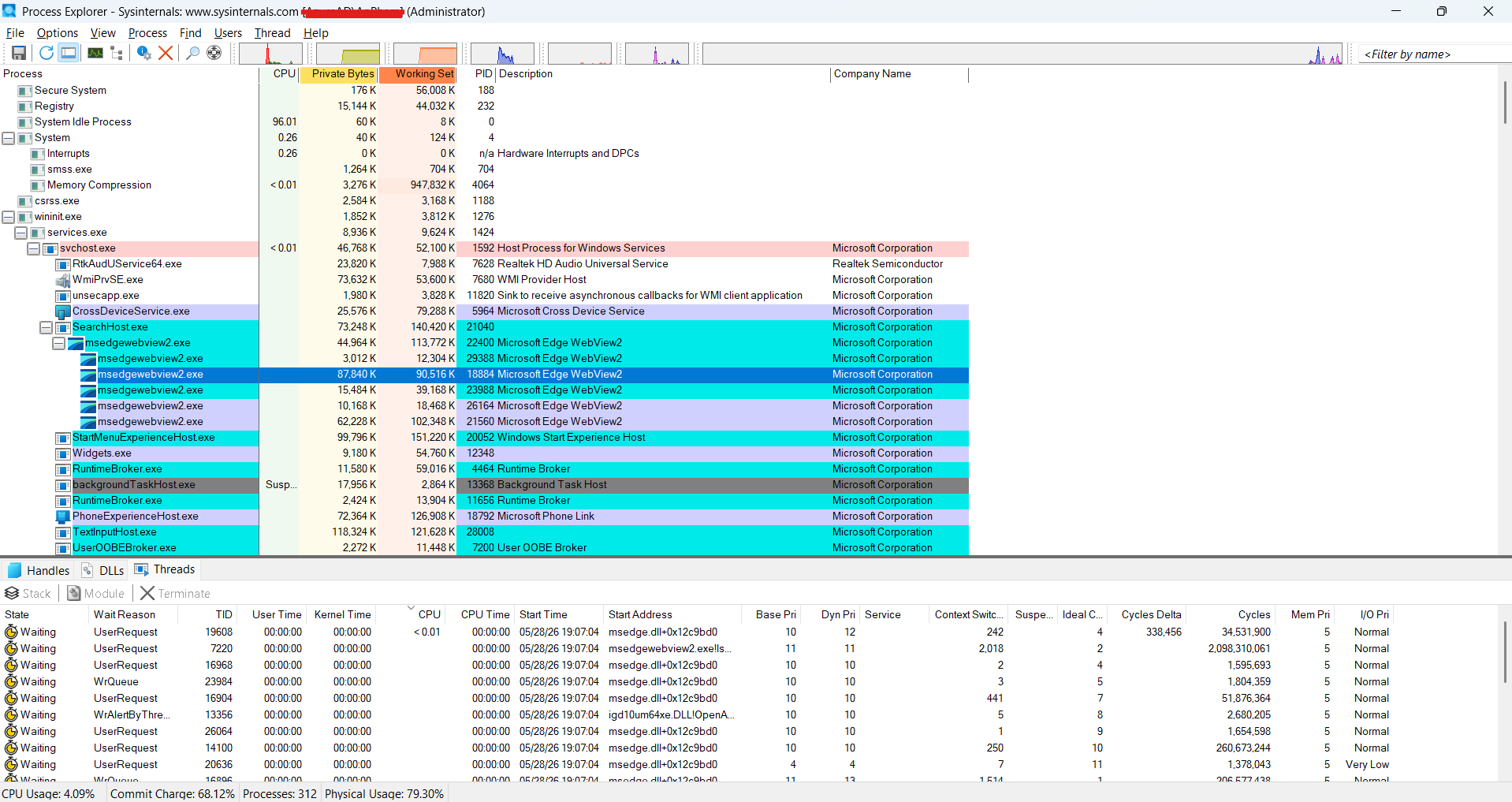
No debugger? Process Explorer shows the same data through a GUI. The main view lists every process on the system - name, PID, CPU, and memory at a glance:
Threads
Threads are the entities that actually run code on the CPU. The process supplies the resources; the threads do the work. Without threads, a process runs nothing at all, and a process hosting several threads at once is called multi-threaded.
Thread Scheduling
When many threads exist on a system, the scheduler rapidly switches between them, creating the illusion that they all run at the same time. In reality the scheduler is just flipping between threads so fast it looks simultaneous. (On a multi-core machine some threads genuinely do run in parallel - one per logical core - but there are almost always far more threads than cores, so switching still dominates.)
The slice of time a thread gets before the scheduler may swap it out is its quantum, measured in scheduler clock ticks rather than wall-clock seconds. Quanta are short - single-digit milliseconds on client Windows - which is why dozens of threads feel concurrent.
Priority. Windows is a priority-driven, preemptive scheduler: it always runs the highest-priority ready thread, and a higher-priority thread becoming ready will preempt a lower one mid-quantum. Priority is a number from 0 to 31, combining a priority class on the process (Idle, Below Normal, Normal, Above Normal, High, Realtime) with a relative priority on the thread within that class. A few ranges are worth knowing:
- 0 - reserved for the zero-page thread (zeroing free memory in the background); nothing else runs at 0.
- 1–15 - the dynamic range where almost all normal threads live.
- 16–31 - the real-time range, which sits above most system activity and requires a privilege to enter. A misbehaving real-time thread can starve the entire system.
Priority boosts. To keep the system responsive, Windows temporarily boosts priority when: a thread completes I/O (so it can process the result quickly), the foreground window’s threads become active (snappier UI), a thread wakes after waiting on an event, or a thread has been ready but unscheduled too long (anti-starvation). Boosts decay back down one level per quantum.
Thread states. At any moment a thread sits in one of several states - scheduling is really just the kernel moving threads between them:
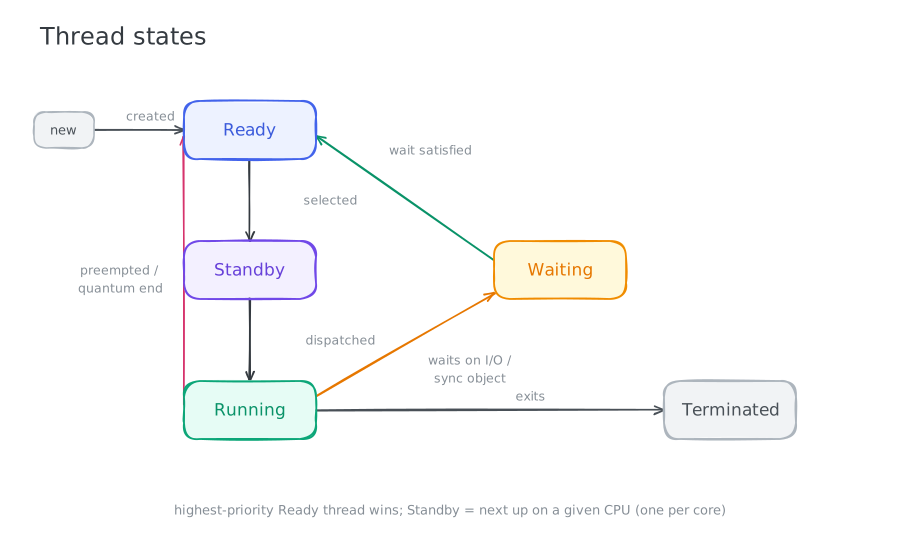
The common path is Ready → Standby → Running. From Running, a thread can be preempted back to Ready, drop into Waiting on a synchronization object or I/O, or finish and become Terminated. Standby means “selected to run next on a specific processor” - only one thread per processor can occupy that state at a time.
Thread Resources
The process provides a lot, but each thread still needs a few things of its own.
- Context - A per-thread structure (managed by the kernel) that captures the state of all CPU registers as of the last time the thread ran. This matters because only one thread can occupy a given CPU at a time. When Windows switches threads, it saves the current register state into the outgoing thread’s context and restores it when that thread is scheduled again. The layout is processor-specific - here’s the x64 version:
 1typedef struct _CONTEXT {
 2  DWORD64 P1Home;
 3  DWORD64 P2Home;
 4  DWORD64 P3Home;
 5  DWORD64 P4Home;
 6  DWORD64 P5Home;
 7  DWORD64 P6Home;
 8  DWORD   ContextFlags;
 9  DWORD   MxCsr;
10  WORD    SegCs;
11  WORD    SegDs;
12  WORD    SegEs;
13  WORD    SegFs;
14  WORD    SegGs;
15  WORD    SegSs;
16  DWORD   EFlags;
17  DWORD64 Dr0;
18  DWORD64 Dr1;
19  DWORD64 Dr2;
20  DWORD64 Dr3;
21  DWORD64 Dr6;
22  DWORD64 Dr7;
23  DWORD64 Rax;
24  DWORD64 Rcx;
25  DWORD64 Rdx;
26  DWORD64 Rbx;
27  DWORD64 Rsp;
28  DWORD64 Rbp;
29  DWORD64 Rsi;
30  DWORD64 Rdi;
31  DWORD64 R8;
32  DWORD64 R9;
33  DWORD64 R10;
34  DWORD64 R11;
35  DWORD64 R12;
36  DWORD64 R13;
37  DWORD64 R14;
38  DWORD64 R15;
39  DWORD64 Rip;
40  union {
41    XMM_SAVE_AREA32 FltSave;
42    NEON128         Q[16];
43    ULONGLONG       D[32];
44    struct {
45      M128A Header[2];
46      M128A Legacy[8];
47      M128A Xmm0;
48      M128A Xmm1;
49      M128A Xmm2;
50      M128A Xmm3;
51      M128A Xmm4;
52      M128A Xmm5;
53      M128A Xmm6;
54      M128A Xmm7;
55      M128A Xmm8;
56      M128A Xmm9;
57      M128A Xmm10;
58      M128A Xmm11;
59      M128A Xmm12;
60      M128A Xmm13;
61      M128A Xmm14;
62      M128A Xmm15;
63    } DUMMYSTRUCTNAME;
64    DWORD           S[32];
65  } DUMMYUNIONNAME;
66  M128A   VectorRegister[26];
67  DWORD64 VectorControl;
68  DWORD64 DebugControl;
69  DWORD64 LastBranchToRip;
70  DWORD64 LastBranchFromRip;
71  DWORD64 LastExceptionToRip;
72  DWORD64 LastExceptionFromRip;
73} CONTEXT, *PCONTEXT;
Two stacks - Each thread owns a user-mode stack and a kernel-mode stack. The user-mode stack handles ordinary work like local variables. The kernel-mode stack is unreachable from user mode and serves as a security boundary: when a thread issues a syscall, its arguments are copied from the user-mode stack onto the kernel-mode stack. Once the CPU transitions into kernel mode, the kernel validates those arguments - and because the kernel stack can’t be touched from user mode, the thread has no way to tamper with them after validation. That separation is a key security property.
Thread Local Storage (TLS) - Per-thread storage for data that belongs to one thread and shouldn’t be shared with others.
Thread ID (TID) - Every thread gets a unique TID, just as every process gets a unique PID.
Thread Environment Block (TEB) - The thread-level analogue of the PEB: a structure holding most of a thread’s user-mode state - a pointer to its TLS, its
LastErrorValue, a pointer to the PEB, and more. TheLastErrorValuemust be per-thread - if one thread’sGetLastErrorcould see another thread’s error code, the result would be chaos. The TEB is undocumented by Microsoft.Affinity - Setting a thread’s affinity pins it to a specific CPU. Set it to CPU 3 on a four-core machine and the thread will only ever run on CPU 3 until it finishes or the affinity changes.
ETHREAD / KTHREAD structures -
ETHREAD(Executive Thread) is the kernel’s representation of a thread object - a pointer to the PEB, theLastErrorValue, whether this is the initial thread, and so on. Nested inside it,KTHREAD(Kernel Thread) carries scheduling data: a pointer to the kernel stack, when and for how long the thread will run, time spent in user mode, and more. Both are undocumented.
Here’s how a thread’s components fit together, including the kernel-mode ETHREAD/KTHREAD pair:
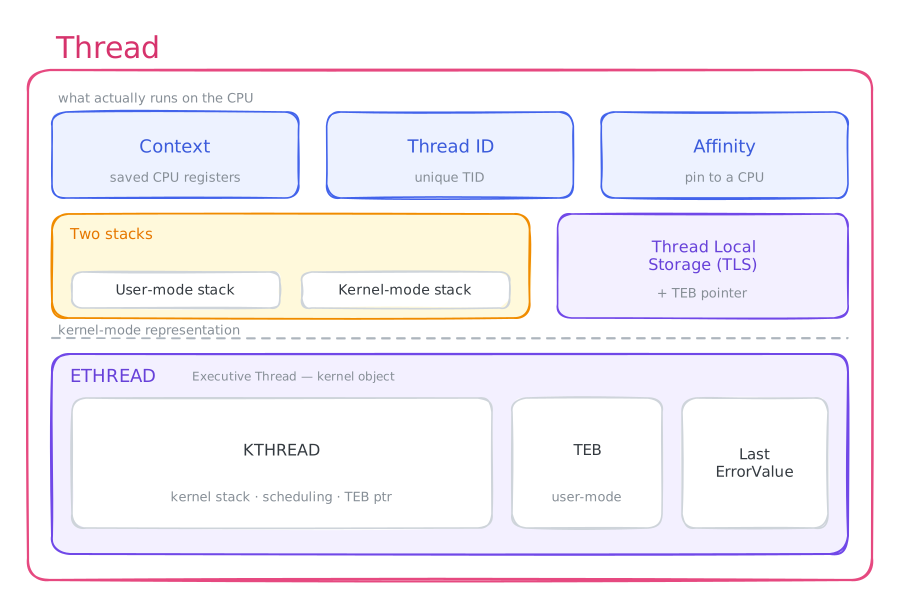
Inspect it yourself
Thread internals are equally observable. A kernel debugger session against the same lsass.exe process gives us the full thread picture.
WinDbg (kernel debugger)
First, confirm the default kernel stack size - 24 KB on this system:
0: kd> dx *(int*)&nt!KeKernelStackSize
*(int*)&nt!KeKernelStackSize : 24576 [Type: int]
Now for the thread structures. Querying lsass.exe with flags 0 2 enumerates its threads and surfaces each ETHREAD address:
0: kd> !process 0 2 lsass.exe
PROCESS ffffcf0514782180
    SessionId: 0  Cid: 02dc    Peb: c7661b7000  ParentCid: 024c
    DirBase: 10c761002  ObjectTable: ffff840f5f125d00  HandleCount: 1388.
    Image: lsass.exe

        THREAD ffffcf0514779080  Cid 02dc.02ec  Teb: 000000c7661bc000 Win32Thread: 0000000000000000 WAIT: (WrLpcReceive) UserMode Non-Alertable
            ffffcf0514779508  Semaphore Limit 0x1
Passing that ETHREAD address to !thread gives a full snapshot: wait reason, priority, context-switch count, kernel stack bounds, and the complete call stack at the moment we sampled it.
0: kd> !thread ffffcf0514779080
THREAD ffffcf0514779080  Cid 02dc.02ec  Teb: 000000c7661bc000 Win32Thread: 0000000000000000 WAIT: (WrLpcReceive) UserMode Non-Alertable
    ffffcf0514779508  Semaphore Limit 0x1
Not impersonating
DeviceMap                 ffff840f5b635a20
Owning Process            ffffcf0514782180       Image:         lsass.exe
Attached Process          N/A            Image:         N/A
Wait Start TickCount      17775          Ticks: 22974 (0:00:05:58.968)
Context Switch Count      2              IdealProcessor: 3
UserTime                  00:00:00.000
KernelTime                00:00:00.000
Win32 Start Address 0x00007ff7a99c20d0
Stack Init fffffe067d107dd0 Current fffffe067d107610
Base fffffe067d108000 Limit fffffe067d102000 Call 0000000000000000
Priority 10  BasePriority 9  IoPriority 2  PagePriority 5
Kernel stack not resident.
Child-SP          RetAddr               : Args to Child                                                           : Call Site
fffffe06`7d107650 fffff801`61cc7260     : ffffac00`ee1db180 00000000`ffffffff 00000000`00000000 00000000`00000000 : nt!KiSwapContext+0x76
fffffe06`7d107790 fffff801`61cc678f     : 00000000`00000003 00000000`00000001 fffffe06`7d107950 00000000`00000000 : nt!KiSwapThread+0x500
fffffe06`7d107840 fffff801`61cc6033     : 00000000`00000000 00000000`00000000 00000000`00000000 ffffcf05`147791c0 : nt!KiCommitThreadWait+0x14f
fffffe06`7d1078e0 fffff801`61d0e386     : ffffcf05`14779508 00000000`00000010 000004e8`fffffb01 000004d0`fffffb00 : nt!KeWaitForSingleObject+0x233
fffffe06`7d1079d0 fffff801`6207dcf8     : ffffffff`ffffffff 00000000`00000001 ffffcf05`1474ee20 00000000`00000000 : nt!AlpcpWaitForSingleObject+0x3e
fffffe06`7d107a10 fffff801`61fe8e25     : ffffffff`00000001 fffffe06`00000000 ffffcf05`1474ee20 ffffcf05`1474ee20 : nt!AlpcpCompleteDeferSignalRequestAndWait+0x3c
fffffe06`7d107a50 fffff801`61fea8bf     : 000000c7`6637f6a0 00000000`00000001 00000000`00000000 fffffe06`7d107af8 : nt!AlpcpReceiveMessagePort+0x265
fffffe06`7d107ac0 fffff801`61feab2b     : fffffe06`7d107ba0 000000c7`6637f6a0 00000000`00000000 00000000`00000000 : nt!AlpcpReceiveLegacyMessage+0x11f
fffffe06`7d107b60 fffff801`61feabcf     : ffffcf05`14779080 00000000`00000200 00000000`00000000 00000000`00000000 : nt!NtReplyWaitReceivePortEx+0xcb
fffffe06`7d107c00 fffff801`61e11505     : ffffcf05`14779080 00000000`00000000 00000000`00000000 ffffcf05`00000000 : nt!NtReplyWaitReceivePort+0xf
fffffe06`7d107c40 00007ffc`9f2ad704     : 00000000`00000000 00000000`00000000 00000000`00000000 00000000`00000000 : nt!KiSystemServiceCopyEnd+0x25 (TrapFrame @ fffffe06`7d107c40)
000000c7`6637f478 00000000`00000000     : 00000000`00000000 00000000`00000000 00000000`00000000 00000000`00000000 : ntdll!NtReplyWaitReceivePort+0x14
ETHREAD and KTHREAD relate to threads exactly as EPROCESS and KPROCESS relate to processes - Executive and Kernel layers respectively. Dumping ETHREAD directly exposes the raw fields:
0: kd> dt nt!_ETHREAD ffffcf0514782180
   +0x000 Tcb              : _KTHREAD
   +0x430 CreateTime       : _LARGE_INTEGER 0x0
   +0x438 ExitTime         : _LARGE_INTEGER 0x0
   +0x438 KeyedWaitChain   : _LIST_ENTRY [ 0x00000000`00000000 - 0x00000000`000002dc ]
   +0x448 PostBlockList    : _LIST_ENTRY [ 0xffffcf05`147dc788 - 0xffffcf05`147755c8 ]
   +0x448 ForwardLinkShadow : 0xffffcf05`147dc788 Void
   +0x450 StartAddress     : 0xffffcf05`147755c8 Void
   +0x458 TerminationPort  : (null)
   +0x458 ReaperLink       : (null)
   +0x458 KeyedWaitValue   : (null)
   +0x460 ActiveTimerListLock : 0x144d0c01`0100d000
   +0x468 ActiveTimerListHead : _LIST_ENTRY [ 0x01dceea5`09511735 - 0x00000000`00005f70 ]
   +0x478 Cid              : _CLIENT_ID
   +0x488 KeyedWaitSemaphore : _KSEMAPHORE
   +0x488 AlpcWaitSemaphore : _KSEMAPHORE
   +0x4a8 ClientSecurity   : _PS_CLIENT_SECURITY_CONTEXT
   +0x4b0 IrpList          : _LIST_ENTRY [ 0xffffcf05`14617310 - 0xffff840f`5f1ab9be ]
   +0x4c0 TopLevelIrp      : 0
   +0x4c8 DeviceToVerify   : (null)
   +0x4d0 Win32StartAddress : (null)
   +0x4d8 ChargeOnlySession : (null)
   +0x4e0 LegacyPowerObject : (null)
   +0x4e8 ThreadListEntry  : _LIST_ENTRY [ 0x00000000`00000000 - 0x00000000`00000000 ]
   +0x4f8 RundownProtect   : _EX_RUNDOWN_REF
   +0x500 ThreadLock       : _EX_PUSH_LOCK
   +0x508 ReadClusterSize  : 0x806504a0
   +0x50c MmLockOrdering   : 0n-2799
   +0x510 CrossThreadFlags : 0
   +0x510 Terminated       : 0y0
   +0x510 ThreadInserted   : 0y0
   +0x510 HideFromDebugger : 0y0
   +0x510 ActiveImpersonationInfo : 0y0
   +0x510 HardErrorsAreDisabled : 0y0
    ...
The nested KTHREAD carries the scheduling internals - stack pointers, cycle time, quantum, and all the per-CPU state the scheduler touches:
0: kd> dx -id 0,0,ffffcf0511067080 -r1 (*((ntkrnlmp!_KTHREAD *)0xffffcf0514782180))
(*((ntkrnlmp!_KTHREAD *)0xffffcf0514782180))                 [Type: _KTHREAD]
    [+0x000] Header           [Type: _DISPATCHER_HEADER]
    [+0x018] SListFaultAddress : 0xffffcf0514782198 [Type: void *]
    [+0x020] QuantumTarget    : 0xffffcf0514782198 [Type: unsigned __int64]
    [+0x028] InitialStack     : 0x10c761002 [Type: void *]
    [+0x030] StackLimit       : 0xffffcf0514779378 [Type: void *]
    [+0x038] StackBase        : 0xffffcf0519c1d378 [Type: void *]
    [+0x040] ThreadLock       : 0x0 [Type: unsigned __int64]
    [+0x048] CycleTime        : 0x0 [Type: unsigned __int64]
    [+0x050] CurrentRunTime   : 0x140001 [Type: unsigned long]
    [+0x054] ExpectedRunTime  : 0x0 [Type: unsigned long]
    [+0x058] KernelStack      : 0xf [Type: void *]
    [+0x060] StateSaveArea    : 0x0 [Type: _XSAVE_FORMAT *]
    [+0x068] SchedulingGroup  : 0x0 [Type: _KSCHEDULING_GROUP *]
    [+0x070] WaitRegister     [Type: _KWAIT_STATUS_REGISTER]
    [+0x071] Running          : 0x0 [Type: unsigned char]
    [+0x072] Alerted          [Type: unsigned char [2]]
    [+0x074 ( 0: 0)] AutoBoostActive  : 0x0 [Type: unsigned long]
    [+0x074 ( 1: 1)] ReadyTransition  : 0x0 [Type: unsigned long]
    [+0x074 ( 2: 2)] WaitNext         : 0x0 [Type: unsigned long]
    [+0x074 ( 3: 3)] SystemAffinityActive : 0x0 [Type: unsigned long]
    [+0x074 ( 4: 4)] Alertable        : 0x0 [Type: unsigned long]
    [+0x074 ( 5: 5)] UserStackWalkActive : 0x0 [Type: unsigned long]
    [+0x074 ( 6: 6)] ApcInterruptRequest : 0x0 [Type: unsigned long]
    [+0x074 ( 7: 7)] QuantumEndMigrate : 0x0 [Type: unsigned long]
    [+0x074 ( 8: 8)] UmsDirectedSwitchEnable : 0x0 [Type: unsigned long]
    [+0x074 ( 9: 9)] TimerActive      : 0x0 [Type: unsigned long]
    [+0x074 (10:10)] SystemThread     : 0x0 [Type: unsigned long]
    [+0x074 (11:11)] ProcessDetachActive : 0x0 [Type: unsigned long]
    [+0x074 (12:12)] CalloutActive    : 0x0 [Type: unsigned long]
    [+0x074 (13:13)] ScbReadyQueue    : 0x0 [Type: unsigned long]
    [+0x074 (14:14)] ApcQueueable     : 0x0 [Type: unsigned long]
    [+0x074 (15:15)] ReservedStackInUse : 0x0 [Type: unsigned long]
    [+0x074 (16:16)] UmsPerformingSyscall : 0x0 [Type: unsigned long]
    [+0x074 (17:17)] TimerSuspended   : 0x0 [Type: unsigned long]
    [+0x074 (18:18)] SuspendedWaitMode : 0x0 [Type: unsigned long]
    [+0x074 (19:19)] SuspendSchedulerApcWait : 0x0 [Type: unsigned long]
    [+0x074 (20:20)] CetUserShadowStack : 0x0 [Type: unsigned long]
    [+0x074 (21:21)] BypassProcessFreeze : 0x0 [Type: unsigned long]
    [+0x074 (31:22)] Reserved         : 0x0 [Type: unsigned long]
    ...
From user mode (no kernel debugger needed)
On x64, the GS segment register always points to the current thread’s TEB, so it’s readable from any user-mode WinDbg session:
// In WinDbg user-mode session: read the TEB of the current thread
0:000> !teb
TEB at 00000025fac41000
    ExceptionList:        0000000000000000
    StackBase:            00000025faba0000
    StackLimit:           00000025fab8f000
    SubSystemTib:         0000000000000000
    FiberData:            0000000000001e00
    ArbitraryUserPointer: 0000000000000000
    Self:                 00000025fac41000
    EnvironmentPointer:   0000000000000000
    ClientId:             00000000000020a4 . 0000000000004c9c
    RpcHandle:            0000000000000000
    Tls Storage:          000001d3e8e49b00
    PEB Address:          00000025fac40000
    LastErrorValue:       2
    LastStatusValue:      c0000034
    Count Owned Locks:    0
    HardErrorMode:        0
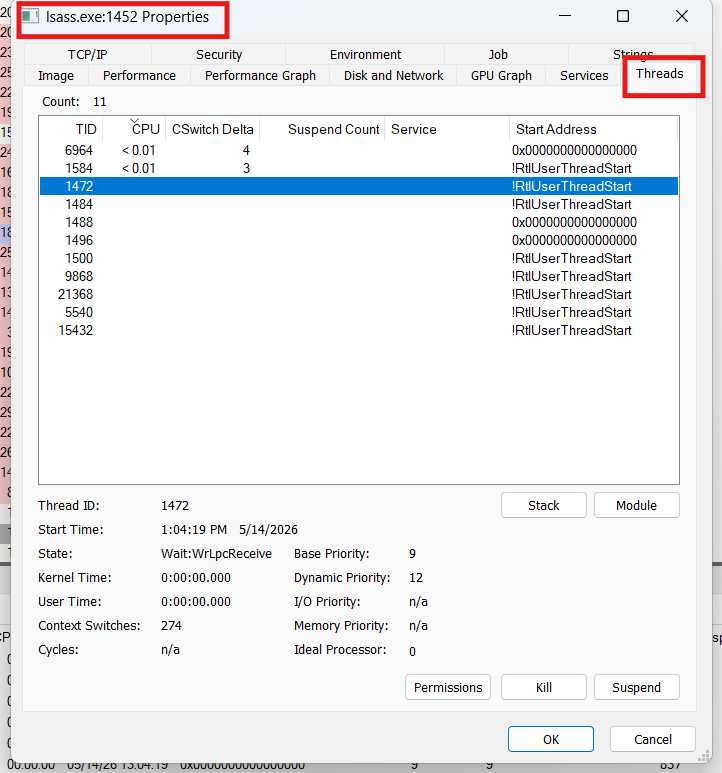
Process Explorer
- Properties → Threads - lists every thread with its TID, start address (symbol-resolved if PDB is loaded), CPU time, and current priority.
Using Threads
Creating a thread is straightforward: call CreateThread with a function address and the new thread begins executing there. That function is the thread’s entry point - it runs the moment the thread starts.
1HANDLE CreateThread(
2  [in, optional]  LPSECURITY_ATTRIBUTES   lpThreadAttributes,
3  [in]            SIZE_T                  dwStackSize,
4  [in]            LPTHREAD_START_ROUTINE  lpStartAddress,
5  [in, optional]  __drv_aliasesMem LPVOID lpParameter,
6  [in]            DWORD                   dwCreationFlags,
7  [out, optional] LPDWORD                 lpThreadId
8);
lpThreadAttributes- security attributes for the new thread. PassNULLfor defaults.dwStackSize- initial stack size. Pass0for the default.lpStartAddress- the entry-point function.lpParameter- an arbitrary value passed straight through to the entry point.dwCreationFlags- pass0to start immediately, orCREATE_SUSPENDEDto start paused.lpThreadId- receives the new thread’s TID. PassNULLif you don’t need it.
A note on the C runtime.
CreateThreadis the raw Win32 call and works fine if the thread never touches the C runtime (CRT). If it does use CRT functions, prefer_beginthreadex- it initializes and cleans up the per-thread CRT state that functions likestrtokrely on. Skipping it can leak that state silently._beginthreadexcallsCreateThreadinternally, so you lose nothing.Entry-point signature. The function you pass must match
LPTHREAD_START_ROUTINE:DWORD WINAPI ThreadProc(LPVOID lpParameter). Getting the signature right avoids casts and undefined behavior from a mismatched calling convention.
Fibers
Fibers are units of execution that you schedule manually, rather than leaving it to the kernel scheduler. A single thread can hold many fibers but runs only one at a time - and you pick which, explicitly, by calling SwitchToFiber. Because they live entirely in user mode inside Kernel32.dll, the kernel can’t see them at all.
Are fibers still worth using? Mostly, no. Fibers predate modern async primitives and are considered largely legacy - Microsoft itself notes they rarely offer an advantage over well-designed multithreaded code. They also interact badly with the C runtime and thread-local storage, since fibers sharing a thread also share its TLS slot (fibers get their own fiber-local storage, FLS, via
FlsAlloc/FlsGetValue, precisely to work around this). Unless you’re porting code built around a cooperative scheduler, reach for threads, thread pools, or async I/O instead. They remain a great vehicle for understanding cooperative scheduling, which is why we cover them here.
The key distinction is who does the scheduling. The kernel preemptively schedules threads; fibers are switched cooperatively by your own code, and the kernel can’t even see them:
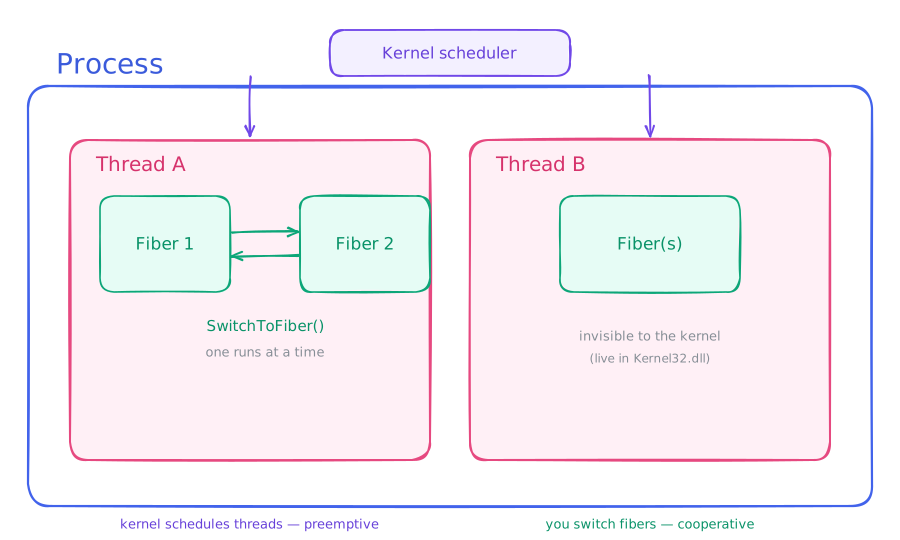
Using Fibers
Start by converting your existing thread into a fiber with ConvertThreadToFiber:
1LPVOID ConvertThreadToFiber(
2  [in, optional] LPVOID lpParameter
3);
This returns the address of the new fiber’s context - you’ll need it for SwitchToFiber later. A fiber context is similar to a thread context but also holds lpParameter, the top and bottom of the fiber’s stack, and a few other items. From this point on, your thread is a fiber; it ends when the fiber’s work finishes or when it calls ExitThread (which terminates both the fiber and the thread).
To create additional fibers, call CreateFiber:
1LPVOID CreateFiber(
2  [in]           SIZE_T                dwStackSize,
3  [in]           LPFIBER_START_ROUTINE lpStartAddress,
4  [in, optional] LPVOID                lpParameter
5);
dwStackSize- the fiber’s stack size;0uses the default (grows up to 1 MB).lpStartAddress- the function that runs when the fiber is scheduled.lpParameter- passed straight through to that function.
CreateFiber only creates the fiber - it doesn’t run it. To actually switch to it, call:
1void SwitchToFiber(
2  [in] LPVOID lpFiber
3);
Pass the fiber context address returned by CreateFiber. Execution transfers immediately. When you’re done, clean up with:
1void DeleteFiber(
2  [in] LPVOID lpFiber
3);
Process vs. thread vs. fiber, at a glance
| Process | Thread | Fiber | |
|---|---|---|---|
| What it is | Container of resources | Unit of execution on the CPU | Unit of cooperative execution |
| Scheduled by | - (holds threads) | Kernel, preemptively | You, manually (SwitchToFiber) |
| Owns | Address space, handles, token | Stacks, context, TLS | A stack + saved context |
| Visible to kernel? | Yes (EPROCESS) | Yes (ETHREAD) | No - pure user-mode |
| How many | 1+ per system | 1+ per process | 0+ per thread, one runs at a time |
| Create with | CreateProcess | CreateThread / _beginthreadex | CreateFiber + SwitchToFiber |
CreateProcess Internals
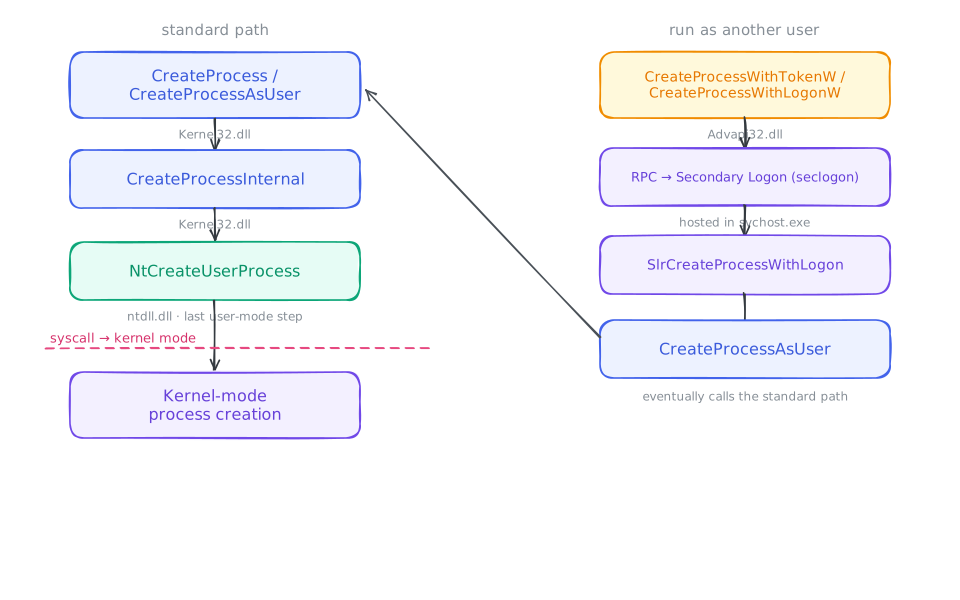
When a thread wants to spin up a new process, it calls CreateProcess and passes parameters to shape the new process however it likes. The function is flexible enough to cover almost every scenario, but sometimes it alone isn’t enough - so the API ships a small family of wrappers:
CreateProcessAsUsercreates a process on behalf of another user by accepting a handle to that user’s primary token.CreateProcessWithTokenWdoes the same but requires a different set of privileges.CreateProcessWithLogonWtakes raw credentials (username, domain, password) instead of a token handle.ShellExecuteis the odd one out. The previous three functions work with any valid PE file regardless of extension - you could renamenotepad.exetonotepad.txtand they’d still launch it.ShellExecuteandShellExecuteExare file-type-aware: they look up the associated program underHKLM\SOFTWARE\ClassesandHKCU\SOFTWARE\Classes, then eventually callCreateProcesswith the right executable and the file path as an argument. Hand it a.txtfile and it launchesnotepad.exe filename.txt.
Both CreateProcess and CreateProcessAsUser are exported by Kernel32.dll. Both eventually funnel into CreateProcessInternal (also in Kernel32.dll), which in turn calls NtCreateUserProcess in ntdll.dll. NtCreateUserProcess is the last stop in user mode - once it finishes, it issues a syscall and crosses into kernel mode. Both CreateProcessInternal and NtCreateUserProcess are officially undocumented.
CreateProcessWithTokenW and CreateProcessWithLogonW, on the other hand, are exported by Advapi32.dll. Each makes an RPC call to the Secondary Logon Service (seclogon.dll, hosted in svchost.exe), which handles the credential lookup and eventually calls CreateProcessAsUser on your behalf.
Putting both paths side by side:
Arguments
CreateProcess takes ten parameters, but most are “pass NULL for the default” knobs that MSDN documents exhaustively. The handful actually worth understanding:
lpApplicationNamevslpCommandLine- the perennial source of confusion. You can name the executable in either. The catch: if you leavelpApplicationNameasNULLand pass an unqualified name inlpCommandLine, Windows runs a search through the app directory, system directories, the current directory, andPATH. Spaces in an unquoted path are a classic source of “it launched the wrong program” bugs.bInheritHandles- whether the child inherits the parent’s inheritable handles. Combined with thebInheritHandleflag inside eachSECURITY_ATTRIBUTES, this is how a parent deliberately hands a specific handle (a pipe, say) down to a child.dwCreationFlags- the two you’ll reach for most:CREATE_SUSPENDED(primary thread starts paused; resume it later withResumeThread- used everywhere from debuggers to job setup) andDEBUG_PROCESS(the caller becomes the new process’s debugger).lpStartupInfo- aSTARTUPINFO/STARTUPINFOEXdescribing the child’s initial window, std handles, and (in the EX form) an attribute list for advanced options like choosing the parent process.lpProcessInformation- the output: the new PID, the primary thread’s TID, and handles to both. You own those two handles and mustCloseHandlethem, even if you never use them - a leak that’s easy to miss because the program still works.
The token/credential parameters are the only meaningful differences between the family members. Everything else lines up.
What happens before
main()?CreateProcessreturning doesn’t mean your code is running. The kernel maps the image, then the loader (ntdll) in the new process maps every dependent DLL, runs theirDllMains and TLS callbacks, and the CRT startup initializes the runtime - then it calls your entry point. A surprising amount of attacker and anti-cheat trickery lives in that window between “process created” and “your first instruction.”
Classification of Processes
Windows defines several (mostly) distinct process types for cases that demand extra security or serve a special purpose. These aren’t launched like ordinary processes, and they carry different attributes.
Protected Processes
Protected processes were originally introduced to satisfy DRM requirements that the media industry imposed for content like HD-DVD.
Normally, any process holding debug privileges - typically administrator-started processes - can read and write the memory of any other process on the system. Useful in many situations, but it directly violates DRM requirements. Protected processes fix this: they coexist with ordinary processes but grant little to no access to outside callers, even ones running as administrator. To actually run as a protected process, the executable must be signed with a special Windows Media Certificate and loads only similarly signed DLLs; its data is reachable only by the kernel or other protected processes. In practice you’ll see this on the audio/video DRM-decoding processes (Audiodg.exe, Mfpmp.exe), the protected crash-reporter (Werfaultsecure.exe - ordinary WER can’t read a crashed protected process’s memory), and the System process itself.
Protected Processes Light (PPL)
PPL is an extended form of protected processes, created to give third-party software - antivirus programs, for example - similar protections. The twist: a PPL’s degree of protection depends on its signature level, so some PPLs are more protected than others. Many core Windows system processes are PPL-protected, including smss.exe, csrss.exe, and services.exe.
Minimal Processes
These are, in essence, empty processes. Their user-mode address space is completely bare: no ntdll.dll or subsystem DLLs, no PEB or TEB, no initial thread, no mapped image. The kernel creates and manages them, and there’s no user-mode way to spawn one - they exist for the system’s own special tasks.
Minimal processes can host minimal threads, which have no TEB and no stack.
A real-world example is the memory compression process, which holds compressed memory from active processes so the system can keep more in RAM instead of paging to disk. It’s hidden from Task Manager because its working set looks alarmingly large (it stores compressed memory belonging to other processes), and users used to find it suspicious. You can spot it in Process Explorer by sorting by working set - it’ll float near the top. It has no threads and no code of its own.
Pico Processes
Pico processes grew out of Microsoft’s research effort known as Project Drawbridge. A pico process is a minimal process paired with a supporting driver called a pico provider. The provider can manage nearly everything about the pico process’s execution - so much so that it can act as a separate kernel for that process, with the process having no idea what the real underlying system is. Memory management, I/O, and thread scheduling, however, remain the job of the genuine Windows kernel.
A pico provider intercepts every operation of its pico process that needs kernel handling - system calls, exceptions, and so on - and responds as it sees fit. Pico processes can host both pico threads (minimal threads for pico processes) and normal threads. Pico threads carry a context stored in the PicoContext member of ETHREAD.
Windows Subsystem for Linux
WSL is built on the pico-process model. It can run an essentially complete Linux system on Windows without a single line of Linux kernel code - made possible by the remarkable control pico providers offer.
WSL’s pico providers are lxss.sys and lxcore.sys. They emulate Linux kernel behavior by translating Linux syscalls from the WSL pico process into NT APIs, or by invoking purpose-built components implemented from scratch.
WSL1 vs WSL2 - an important caveat. Everything above describes WSL1, the pico-process translation layer. WSL2, the current default, works completely differently: it runs a real Linux kernel inside a lightweight Hyper-V virtual machine. WSL2 has no pico processes - it gains full syscall compatibility and better performance at the cost of the seamless integration the pico model gave WSL1. If you’re inspecting Linux processes today, you’re almost certainly looking at WSL2’s genuine Linux kernel, not a pico provider.
Trustlets (Secure Processes)
Trustlets run in Isolated User Mode (IUM), protected by the Hyper-V hypervisor’s Virtual Trust Levels - code running in the normal OS (even the kernel) sits at a lower trust level and cannot read a trustlet’s memory. A trustlet may import only a small allowlist of system-trusted DLLs (the CRT, KernelBase, Advapi, the RPC runtime, CNG crypto, and a few math libraries) that need no syscalls to function. Users can’t create them directly; the kernel does, on behalf of secure features. The canonical example is LSAIso, the isolated process that holds credential secrets for Credential Guard.
The process types in one table
| Type | Who creates it | Key idea |
|---|---|---|
| Normal | Anyone | The everyday process. |
| Protected / PPL | Anyone (needs special signing) | Even admins can’t read its memory; degree of protection set by signature level. |
| Minimal | Kernel only | Empty shell - no PEB/TEB, no image, no ntdll. E.g. memory compression. |
| Pico | Kernel + a pico provider driver | Minimal process whose syscalls/exceptions are handled by a provider driver. Basis of WSL1. |
| Trustlet (IUM) | Kernel, for secure features | Hypervisor-isolated; unreadable by the normal OS. E.g. LSAIso / Credential Guard. |
Jobs
Jobs are a Windows mechanism for grouping multiple processes together under a single management unit. Any limit or change applied to a job affects every process in it - making them useful for resource caps, containment, and monitoring a group of related processes as a whole.
Job objects are shareable, securable, and nameable. Once a process joins a job, it can’t leave. Child processes spawned by members join the same job automatically, unless CREATE_BREAKAWAY_FROM_JOB was passed to CreateProcess and the job permits breakaway.
Two modern details the classic picture leaves out. First, since Windows 8 jobs can be nested - a process can belong to a hierarchy of jobs, with the effective limit being the most restrictive one in the chain. Second, you can attach an I/O completion port to a job (JOBOBJECT_ASSOCIATE_COMPLETION_PORT) to receive notifications as processes enter, exit, or hit limits - far better than polling.
Jobs are the foundation of Windows containers. A silo is an enhanced job that also virtualizes the object namespace. A server silo virtualizes enough of the system (registry, networking, the object manager) to look like a separate OS instance - and that’s exactly what backs Windows Server Containers and Docker on Windows. The humble job object you’ll create below is the same primitive, scaled all the way up to containers.
Job Limits
Some of the limits you can set on a job:
- Max active processes - caps how many processes can exist in the job. Once reached, no new process may be assigned and child-process creation fails.
- Processor affinity - confines every member to a specific set of CPUs.
- Priority class - sets the priority class for all members. If a thread tries to raise its priority class above this, the request is silently ignored.
- Virtual memory limit - caps the virtual memory a single process, or the whole job, may commit.
- Clipboard R/W - forbids all members from reading or writing the clipboard.
API Functions for Working with Jobs
The full job API:
| Function | What it does |
|---|---|
CreateJobObject | Creates (or opens) a named job object |
OpenJobObject | Opens an existing job by name |
AssignProcessToJobObject | Assigns a process to a job |
SetInformationJobObject | Applies limits to the job |
QueryInformationJobObject | Reads current job info and statistics |
TerminateJobObject | Terminates every process in the job |
IsProcessInJob | Checks whether a process belongs to a specific job |
Using Jobs
The workflow is: create a job, assign processes, set limits.
Create a job with CreateJobObject:
1HANDLE CreateJobObjectA(
2  [in, optional] LPSECURITY_ATTRIBUTES lpJobAttributes,
3  [in, optional] LPCSTR                lpName
4);
Pass NULL for both arguments to get an unnamed job with default security. lpName names the job for sharing across processes; if the name collides with an existing mutex, file-mapping object, or waitable timer, the call fails.
Assign processes with AssignProcessToJobObject:
1BOOL AssignProcessToJobObject(
2  [in] HANDLE hJob,
3  [in] HANDLE hProcess
4);
hJob is the job handle; hProcess is a handle to the process you’re adding. Use GetCurrentProcess() to get a handle to the calling process.
Apply limits with SetInformationJobObject:
1BOOL SetInformationJobObject(
2  [in] HANDLE             hJob,
3  [in] JOBOBJECTINFOCLASS JobObjectInformationClass,
4  [in] LPVOID             lpJobObjectInformation,
5  [in] DWORD              cbJobObjectInformationLength
6);
JobObjectInformationClass selects which category of limits you’re setting (basic, extended, UI, etc.); lpJobObjectInformation points to the appropriate structure.
Real-World Example: How Cargo Tears Down Its Process Tree
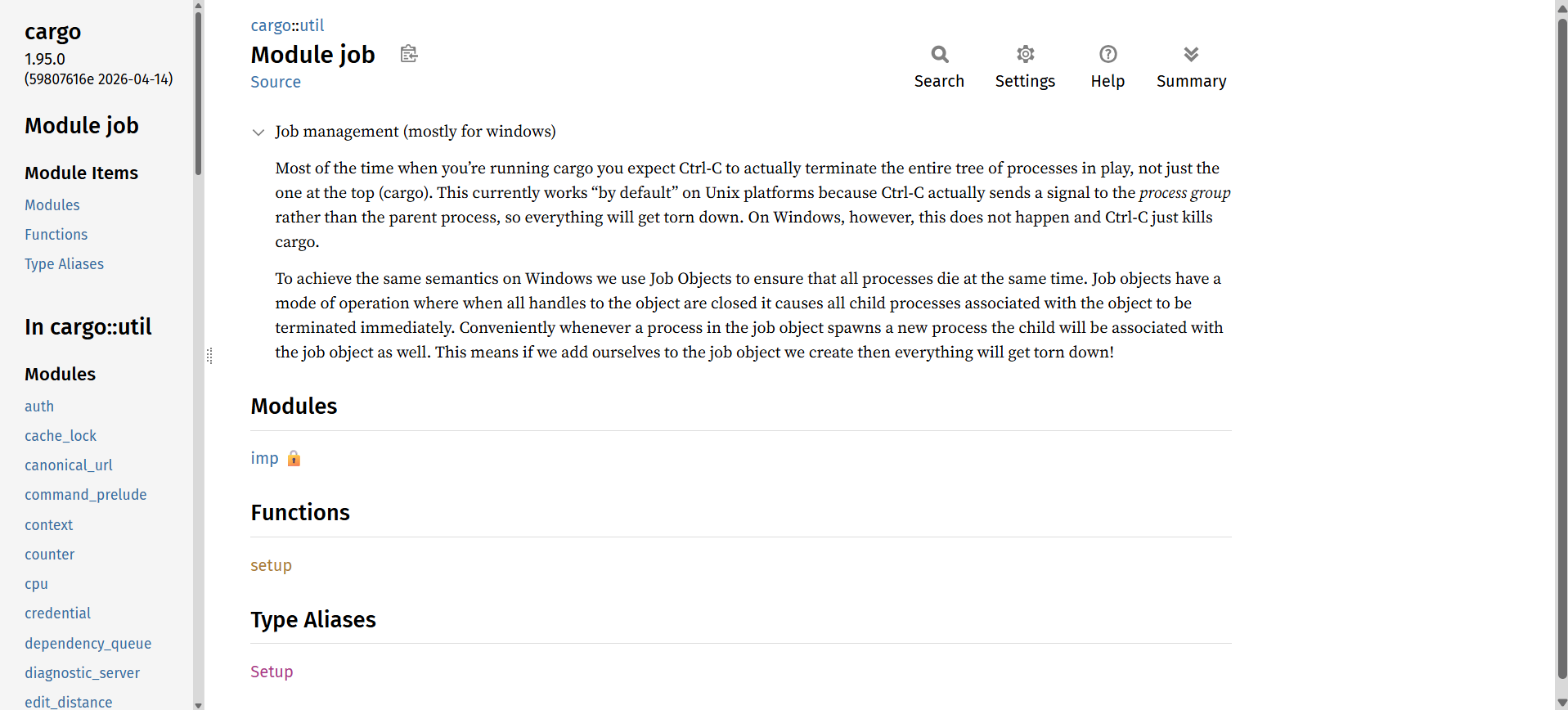
When you hit Ctrl-C during cargo build, you expect the whole tree to die - cargo, rustc, every build script. On Unix this works for free: Ctrl-C signals the whole process group. On Windows it doesn’t - only cargo dies, orphaning its children.
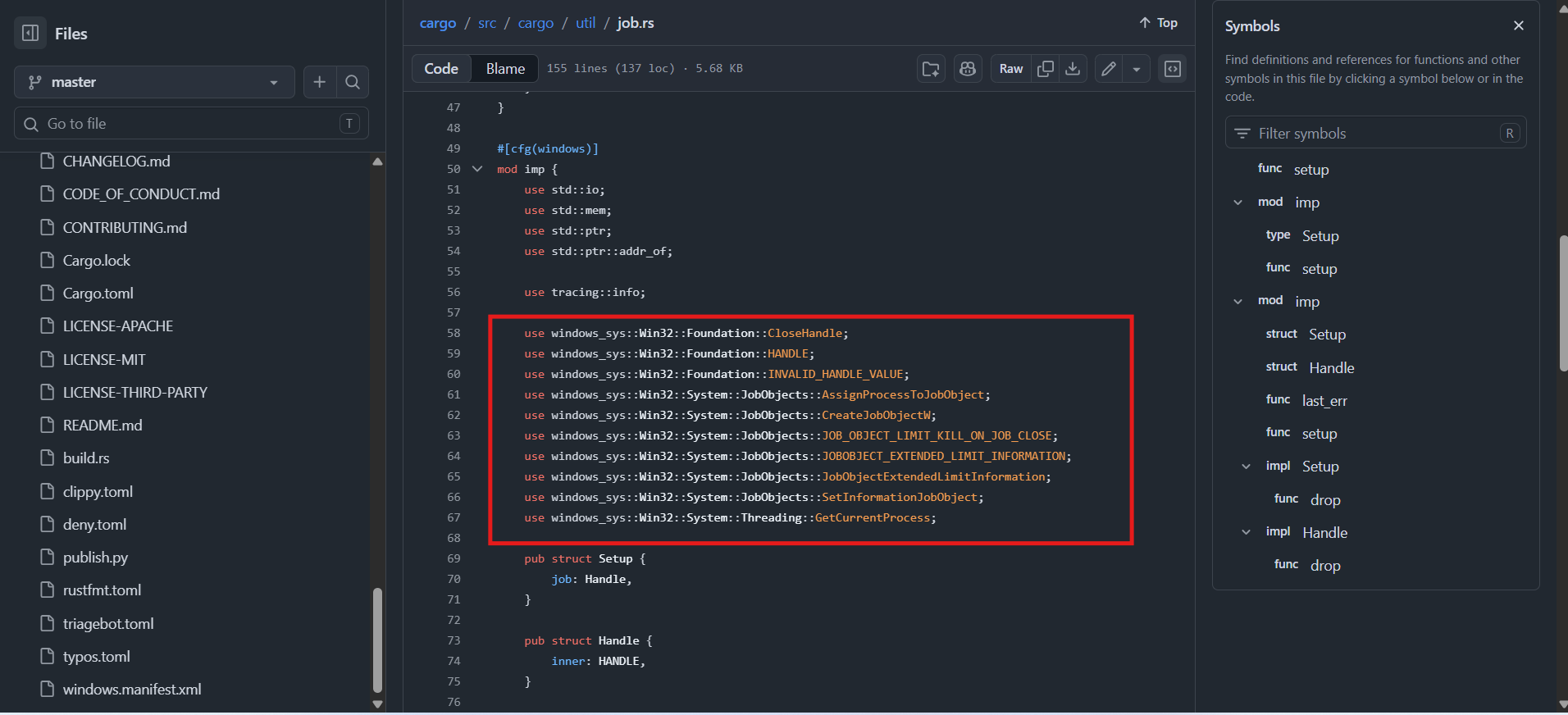
Cargo’s fix lives in src/cargo/util/job.rs: create a Job Object, set KILL_ON_JOB_CLOSE, and assign cargo itself to it. Children automatically inherit the job, so the entire tree is grouped with zero PID tracking.
Code Examples
Now that the fundamentals are covered, let’s see how each of these objects looks in practice.
Creating a Process
CreateProcess is simpler than its parameter list suggests - most arguments default to NULL.
 1#include <stdio.h>
 2#include <windows.h>
 3
 4int main(){
 5    STARTUPINFOA si;
 6    PROCESS_INFORMATION pi;
 7
 8    ZeroMemory( &si, sizeof(si) );
 9    si.cb = sizeof(si);
10    ZeroMemory( &pi, sizeof(pi) );
11    LPSTR lpCommandLine = "notepad.exe";
12
13    if( !CreateProcessA( NULL,   // No module name (use command line)
14        lpCommandLine,
15        0,           // Process handle not inheritable
16        0,           // Thread handle not inheritable
17        0,           // No handle inheritance
18        0,           // No creation flags
19        0,           // Use parent's environment block
20        0,           // Use parent's starting directory
21        &si,
22        &pi )
23    ){
24        printf( "CreateProcess failed (%d).\n", GetLastError() );
25        return -1;
26    }
27    printf("Process Created!\n");
28
29    Sleep(5000);
30
31    // Always close both handles - even if you never use them.
32    CloseHandle( pi.hProcess );
33    CloseHandle( pi.hThread );
34
35    return 0;
36}
This launches notepad.exe and exits after five seconds. The two CloseHandle calls at the end are mandatory - CreateProcess always hands you a process handle and a thread handle, and you own them regardless of whether you do anything with them.
Creating a Thread
 1#include <stdio.h>
 2#include <windows.h>
 3
 4DWORD WINAPI EthicalFunction(LPVOID lpParam)
 5{
 6    printf("Thread created\n");
 7    printf("For educational purposes only*\n");
 8    return 0;
 9}
10
11int main()
12{
13    HANDLE hThread = CreateThread(NULL, 0, EthicalFunction, NULL, 0, NULL);
14    WaitForSingleObject(hThread, INFINITE);
15    printf("Thread returned\n");
16    printf("Exiting...\n");
17    CloseHandle(hThread);
18    return 0;
19}
EthicalFunction runs on the new thread while main blocks on WaitForSingleObject. Once the thread returns, main resumes, prints its message, and closes the handle. That WaitForSingleObject + CloseHandle pattern is the baseline for any thread you create.
Creating a Fiber
Fibers require an extra step: you must convert the current thread into a fiber before you can create more.
 1#include <stdio.h>
 2#include <windows.h>
 3
 4VOID CALLBACK fiber_function(LPVOID lpParam)
 5{
 6    printf("Fiber created\n");
 7    printf("For educational purposes only*\n");
 8    // Switch back to the main fiber - fibers don't return normally.
 9    SwitchToFiber(lpParam);
10}
11
12int main()
13{
14    // Step 1: convert this thread into a fiber.
15    LPVOID Context = ConvertThreadToFiber(NULL);
16    // Step 2: create another fiber, passing our context so it can switch back.
17    LPVOID lpFiber = CreateFiber(0, fiber_function, Context);
18    // Step 3: switch to it. Execution transfers immediately.
19    SwitchToFiber(lpFiber);
20    // We're back. Clean up.
21    printf("Fiber returned\n");
22    DeleteFiber(lpFiber);
23    printf("Exiting...\n");
24    return 0;
25}
Notice that fiber_function doesn’t return - it switches back to the main fiber explicitly. That’s the cooperative scheduling model in miniature: you are always in control of when the switch happens.
Creating a Job Object
This example creates a job, puts two processes into it suspended, then resumes them and terminates the whole group after a minute.
 1#include <stdio.h>
 2#include <windows.h>
 3
 4int main()
 5{
 6    HANDLE hJob = CreateJobObject(NULL, "Unemployed");
 7
 8    // Kill all processes in the job when the job handle closes.
 9    JOBOBJECT_EXTENDED_LIMIT_INFORMATION jeli = {0};
10    jeli.BasicLimitInformation.LimitFlags = JOB_OBJECT_LIMIT_KILL_ON_JOB_CLOSE;
11    SetInformationJobObject(hJob, JobObjectExtendedLimitInformation, &jeli, sizeof(jeli));
12
13    STARTUPINFOA si = {0};  si.cb = sizeof(si);
14    STARTUPINFOA si1 = {0}; si1.cb = sizeof(si1);
15    PROCESS_INFORMATION pi = {0};
16    PROCESS_INFORMATION pi1 = {0};
17
18    // Create both processes suspended so we can assign them before they run.
19    if (!CreateProcessA(NULL, (LPSTR)"notepad.exe", NULL, NULL, FALSE, CREATE_SUSPENDED, NULL, NULL, &si, &pi) ||
20        !CreateProcessA(NULL, (LPSTR)"dvdplay.exe",  NULL, NULL, FALSE, CREATE_SUSPENDED, NULL, NULL, &si1, &pi1))
21    {
22        printf("Error creating processes: %d\n", GetLastError());
23        return 1;
24    }
25
26    AssignProcessToJobObject(hJob, pi.hProcess);
27    AssignProcessToJobObject(hJob, pi1.hProcess);
28
29    ResumeThread(pi.hThread);
30    ResumeThread(pi1.hThread);
31    printf("Job created and processes added!\n");
32
33    Sleep(60000);
34    TerminateJobObject(hJob, 0);
35
36    CloseHandle(pi.hProcess);
37    CloseHandle(pi.hThread);
38    CloseHandle(hJob);
39
40    printf("Exiting...\n");
41    return 0;
42}
The CREATE_SUSPENDED flag is the key detail: it gives you a window to assign the processes to the job before they run, avoiding a race where a child could spawn sub-processes before the assignment takes effect. To verify both processes are inside the Unemployed job, open Process Explorer and check Properties → Job on either notepad.exe or wmplayer.exe.
Common Pitfalls
A few traps that bite people working with these APIs:
- Leaking handles.
CreateProcesshands you two handles inPROCESS_INFORMATION- process and thread. Forgetting toCloseHandleboth is a slow leak that’s easy to miss because the program still works fine. CreateThread+ the C runtime. If a thread calls CRT functions, use_beginthreadexinstead ofCreateThread- rawCreateThreadleaves per-thread CRT state (likestrtok’s buffer) uninitialized or leaked.- Stack reserve adds up. Each thread reserves ~1 MB of address space by default. Spawn thousands of threads in a 32-bit process and you’ll exhaust the address space long before you run out of CPU - one reason thread pools exist.
- Priority is not a guarantee. A higher priority makes a thread preferred, not first - boosts, affinity, and what other cores are doing all factor in. Don’t use priorities as a synchronization mechanism.
- Reaching for fibers too early. They look like cheap threads but bring TLS/CRT hazards and offer no multi-core parallelism. Default to threads, thread pools, or async I/O.
How This Maps to Linux
If you come from a Unix background, the Windows model lines up roughly like this:
| Windows | Linux / POSIX |
|---|---|
Process (CreateProcess) | Process (fork + execve) |
Thread (CreateThread) | Thread / task (pthread_create, clone) |
Fiber (CreateFiber) | ucontext (makecontext/swapcontext), green threads |
| Thread affinity | sched_setaffinity / taskset |
| Job object | cgroups (resource grouping & limits) |
| Access token | uid/gid + capabilities |
| Handle / handle table | File descriptor / fd table |
The biggest conceptual difference: Linux blurs the process/thread line - both are just “tasks” from clone with different sharing flags. Windows keeps a hard, explicit split between the process container and the threads inside it.
Summary
We walked through the four building blocks of execution on Windows - processes (resource containers), threads (what the kernel preemptively schedules), fibers (cooperative units you schedule yourself), and jobs (groups of processes with shared limits, and the primitive behind Windows containers) - along with the kernel structures (EPROCESS/KPROCESS, ETHREAD/KTHREAD) that back them and the special process types Windows defines for security and isolation. Along the way we looked at how the scheduler actually decides what runs, how CreateProcess calls down into the kernel, and how to create each object in code - plus how to observe all of it live with WinDbg or Process Explorer.
If you take three things away: threads are scheduled for you while fibers are scheduled by you; nearly every structure here is inspectable on a running machine; and the same job object you used to babysit two Notepads is, scaled up, what runs Windows containers. Thanks for reading!
Resources
- Processes and Threads - Microsoft Docs
- CreateProcess - Microsoft Docs
- CreateJobObject - Microsoft Docs
- AssignProcessToJobObject - Microsoft Docs
- AssignProcessToJobObject fails with “Access Denied” under the debugger - Stack Overflow
- TerminateJobObject - Microsoft Docs
- CreateThread - Microsoft Docs
- CreateFiber - Microsoft Docs
- SwitchToFiber - Microsoft Docs
- Isolated User Mode (IUM) Processes - Microsoft Docs